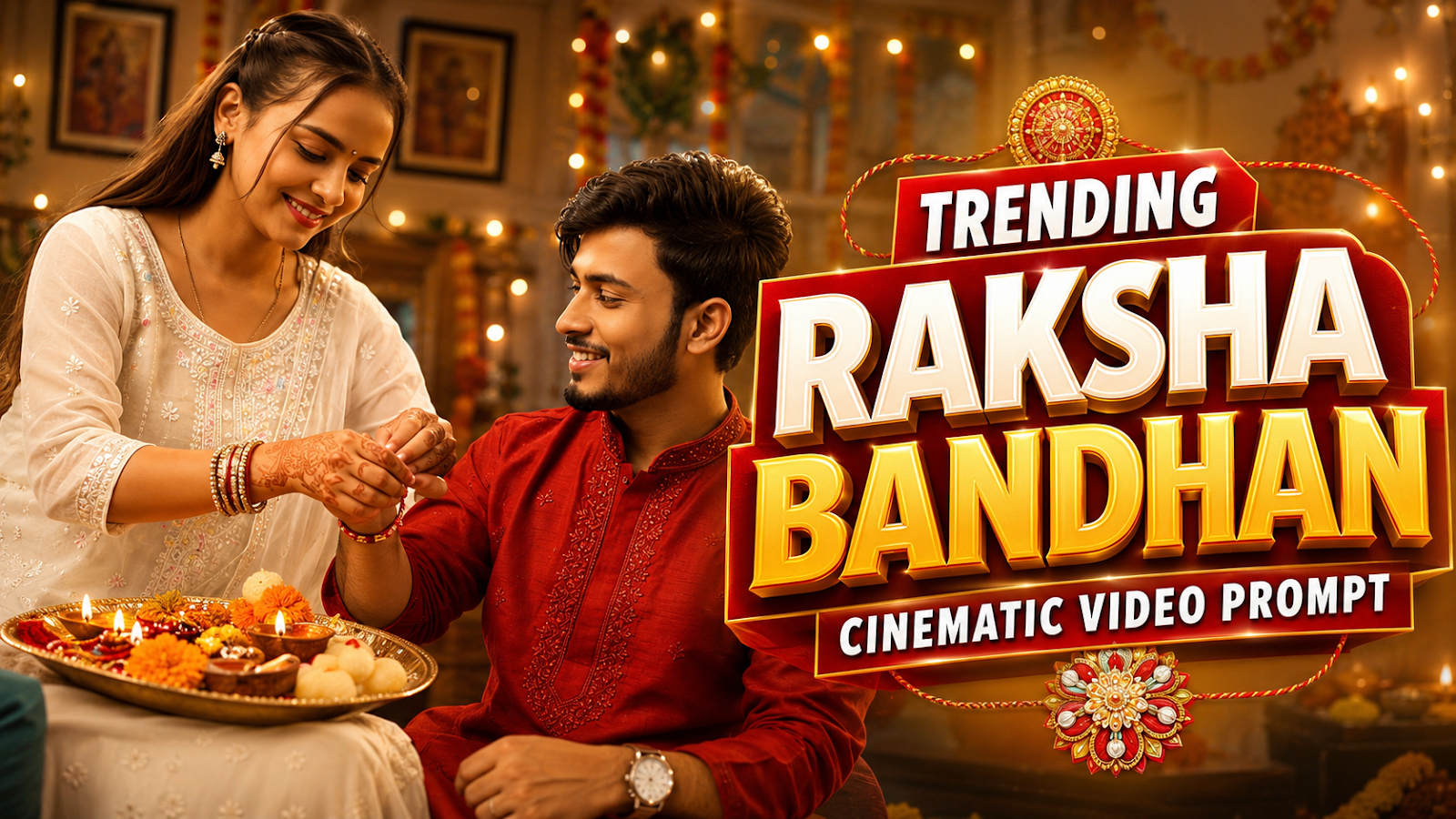
trending Raksha Bandhan Cinematic Video Prompt 2026 is a creative way to turn ordinary brother-sister photos into beautiful festival videos using AI. Instead of posting only a simple Rakhi photograph, users can now create short cinematic scenes featuring traditional outfits, Rakhi rituals, festive decorations, natural expressions, and smooth camera movement.
Raksha Bandhan is already one of the most emotional and visually attractive Indian festivals. A decorated Rakhi thali, colorful flowers, sweets, traditional clothes, glowing diyas, and the bond between a brother and sister can naturally create a strong cinematic look.
With modern AI video tools, you can use your own photograph as a reference and describe the scene you want to create. The AI can then transform that idea into a short festival-style clip that can be used for Instagram Reels, YouTube Shorts, WhatsApp Status, or other social media posts.
In this article, we will explore how AI Rakhi Video Editing works, a cinematic Raksha Bandhan video prompt, useful editing ideas, and simple tips for getting more natural-looking results.
(toc)
What Is Raksha Bandhan Cinematic AI Video Editing?
Raksha Bandhan cinematic AI video editing means creating or animating festival scenes with the help of artificial intelligence.
For example, you can start with a normal photo of a brother and sister. A detailed video prompt can tell the AI to create subtle movements such as the sister tying Rakhi, both siblings smiling naturally, flower petals moving gently, diyas glowing in the background, or the camera slowly moving toward the subjects.
The objective is not to add too many effects. A good cinematic video should still look natural.
Small movements, realistic expressions, balanced lighting, and a clear festival atmosphere usually look more convincing than an overloaded scene.
Why Brother Sister Video Prompts Are Trending
Festival content performs well on social media because people can immediately relate to the occasion.
Raksha Bandhan offers several visually interesting moments, including:
- Tying the Rakhi
- Applying tilak
- Sharing sweets
- Exchanging gifts
- Taking brother-sister photos
- Decorating the Rakhi thali
- Family celebrations
- Traditional festive outfits
AI makes it possible to recreate these moments creatively even when you do not have access to a professional camera setup or elaborate festival decorations.
This is especially useful for creators who want short vertical videos for Reels and Shorts.
Trending Raksha Bandhan Cinematic Video Prompt 2026
Use your own brother-sister photo as the reference image and try a prompt like this:
Master Prompt
Use the two uploaded reference photographs exclusively to establish the identities of the brother and sister. Their recognizable facial structure, natural complexion, hairstyle, apparent age, physique and overall appearance must remain visually consistent from the opening frame to the final frame. Do not blend, reinterpret or substitute either identity.
Dress the brother in an elegant deep-red festive kurta featuring refined tonal embroidery, crisp white tailored trousers, traditional Indian footwear and a sophisticated wristwatch. Dress the sister in a graceful white embroidered ethnic ensemble with a neatly arranged matching dupatta, understated earrings and traditional bangles. Once established, every clothing detail, accessory, fabric color and hairstyle must remain unchanged.
Create a 10-second photorealistic Raksha Bandhan film moment set in an elegant Indian living space prepared for the festival.
0–3 Seconds — Festive Establishing Moment
Open with a softly moving cinematic composition showing the siblings seated comfortably together in the decorated room.
In the foreground, place an ornate festive thali containing a handcrafted Rakhi, rice grains, fresh flower petals, a small illuminated diya, rasgulla, peda and assorted Indian sweets.
Surround the scene with tasteful marigold arrangements, tiny warm fairy lights, brass diyas and scattered petals. Golden practical lighting should softly illuminate their faces.
The siblings briefly exchange relaxed, genuine smiles while the camera gradually moves closer, creating the feeling of a naturally captured family celebration rather than a posed scene.
3–7 Seconds — The Rakhi Moment
The sister naturally reaches toward the thali, picks up the Rakhi and brings it toward her brother’s extended wrist.
Show her carefully securing the Rakhi using believable wrist, hand and finger movements. Maintain anatomically correct hands throughout the interaction.
Transition smoothly into a detailed cinematic insert shot focusing on the Rakhi resting against the brother’s wrist. Preserve the same wristwatch, clothing sleeves, skin tone and physical proportions between shots.
The brother watches his sister with a gentle, appreciative smile while she concentrates naturally on completing the ritual.
7–10 Seconds — Emotional Closing Frame
After securing the Rakhi, the sister looks toward her brother and smiles. He briefly admires the Rakhi before returning her smile.
Gradually move the camera backward to reveal the complete festive environment again—the glowing diyas, floral decorations, sweets, thali and softly illuminated room.
A few lightweight flower petals drift naturally through the foreground as warm golden illumination fills the closing frame.
Integrate an elegant “Happy Raksha Bandhan” festive decoration into the physical background of the room. It should remain stable, correctly spelled, clearly readable and naturally integrated with the décor rather than appearing as a floating digital overlay.
Cinematic Treatment
Aim for the appearance of premium live-action Indian festive cinematography rather than synthetic AI imagery. Use highly realistic skin detail, authentic textile texture, believable reflections on jewelry and metallic objects, natural eye movement, subtle blinking, breathing and physically accurate fabric motion.
Use warm golden practical lighting with restrained volumetric illumination, shallow cinematic depth of field, soft foreground separation, creamy background bokeh, subtle optical flare and delicate film grain.
Emulate an 85mm cinematic portrait lens at approximately f/1.8, with polished HDR exposure and professional warm festive color grading.
Camera choreography should feel continuous and intentional: begin with a controlled establishing movement, transition naturally toward the wrist for the Rakhi detail, then finish with a slow atmospheric pull-back.
Continuity & Negative Instructions
Maintain strict facial and body continuity throughout all 10 seconds.
Avoid identity drift, facial blending, face replacement, facial restructuring, hairstyle variation, skin-tone shifts, age changes, wardrobe transformations, changing embroidery, disappearing accessories, duplicate people, additional people, malformed hands, fused fingers, extra fingers, incorrect wrist anatomy, floating objects, inconsistent Rakhi placement, unnatural gestures, robotic expressions, abrupt body movement, frame-to-frame deformation, background instability, flickering lights, camera jitter, sudden scene changes, artificial plastic skin, cartoon rendering, obvious CGI aesthetics, malformed typography, misspelled background text, additional captions, logos, signatures or watermarks.
How to Create a Raksha Bandhan AI Video
Creating a Rakhi video does not require complicated editing if your AI video tool supports image-to-video generation.
1. Choose a Clear Reference Photo
Select a high-quality brother-sister photograph.
Try to use an image where:
- Both faces are clearly visible
- Lighting is good
- Hands are not hidden too much
- The photograph is not blurry
- Subjects are separated clearly from the background
A clear source image gives the AI more visual information to work with.
2. Upload Your Photo
Open your preferred AI image-to-video tool and select the reference-image option.
Upload only photos that you own or have permission to use.
3. Add the Video Prompt
Paste the cinematic Raksha Bandhan prompt and customize details such as clothing, background, decorations, camera movement, or lighting according to your photograph.
Avoid adding too many actions to one short clip.
For example, asking the AI to perform Rakhi tying, gift exchange, eating sweets, hugging, walking, dancing, and multiple camera movements in a few seconds may produce unnatural results.
4. Generate a Short Clip
For social media, a short scene can often look better than a very long AI-generated sequence.
You can generate separate clips for different moments and combine them later during editing.
5. Preview the Result
Watch the generated video carefully.
Pay particular attention to:
- Face consistency
- Hands and fingers
- Rakhi placement
- Eye movement
- Clothing
- Background objects
- Camera movement
Regenerate the clip if a major visual error appears.
6. Edit the Final Video
After generating your clips, import them into your preferred video editor.
You can add smooth cuts, simple transitions, festival-themed text, your own voice-over, or music that you have permission to use.
For Reels and Shorts, 9:16 vertical format is usually the most convenient.
Cinematic Rakhi Video Ideas
You do not need to create the same Raksha Bandhan scene every time. Changing the environment can make your content feel fresh.
Traditional Home Celebration
Create a warm Indian home decorated with marigold flowers, fairy lights, diyas, sweets, and a beautiful Rakhi thali.
Morning Rakhi Ceremony
Use soft morning sunlight coming through a window while the sister ties Rakhi on her brother’s wrist.
This style can produce a more realistic lifestyle-photography look.
Premium Festive Portrait
Show the brother and sister standing together in elegant traditional clothing after completing the Rakhi ceremony.
Use a slow camera push-in with subtle background bokeh.
Gift Exchange Scene
Create a moment where the brother gives his sister a beautifully wrapped gift after the Rakhi ceremony.
Keep the movements minimal so the hands remain realistic.
Family Celebration
A wider cinematic composition can include subtle festive decorations and family members in the background while keeping the brother and sister as the main subjects.
Tips for More Realistic AI Rakhi Videos
The quality of a Brother Sister Video Prompt depends on both the reference photo and the instructions given to the AI.
Keep the main action simple. One clear movement usually produces a more convincing result than several complicated movements happening simultaneously.
Mention natural facial expressions instead of exaggerated reactions.
Use descriptions such as “soft golden morning light,” “warm indoor festival lighting,” or “natural window lighting” instead of adding many different lighting effects.
Camera movement should also remain simple. Slow zoom-in, gentle push-in, or subtle handheld movement can create cinematic depth without making the video distracting.
Most importantly, always review the final generation before publishing it.
AI-generated hands, accessories, text, and small background details can occasionally contain errors.
How to Make Your Raksha Bandhan Reel More Attractive
A good AI generation is only one part of the final video.
Your opening seconds should immediately show the main visual moment. Instead of adding a long introduction, begin with the brother-sister scene or Rakhi ceremony.
You can then add short text such as:
Raksha Bandhan AI Video
or
Brother Sister Cinematic Edit
Keep text away from faces and important visual details.
If you add music, use audio you are legally allowed to publish on the platform where the video will appear.
A clean video with one strong scene generally looks more professional than a clip filled with unnecessary transitions and effects.
Common Mistakes to Avoid
One common mistake is using a low-resolution reference photo. The AI may struggle to preserve facial details when the original image is heavily blurred or compressed.
Another mistake is writing an extremely long prompt containing many unrelated scenes.
It is better to generate several short clips and edit them together.
Creators should also avoid publishing a generation without checking facial consistency, hands, clothing, or background details.
Finally, do not present an AI-created event as a real event when doing so could mislead viewers. If needed, you can clearly identify creative content as AI-generated.
Frequently Asked Questions
What is a Raksha Bandhan cinematic video prompt?
A Raksha Bandhan cinematic video prompt is a written instruction that tells an AI video generator how to create a festive brother-sister scene, including actions, lighting, camera movement, clothing, decorations, and visual style.
Can I create a Rakhi video from my own photo?
Yes. If the AI tool supports image-to-video generation, you can upload a suitable photograph and use it as the visual reference for your video.
What is the best ratio for Raksha Bandhan Reels?
For Instagram Reels and YouTube Shorts, 9:16 is the standard vertical format and works well for full-screen mobile viewing.
How can I keep faces realistic in an AI video?
Start with a clear reference image and specifically ask the AI to preserve facial identity and natural appearance. Keep camera movement and character actions relatively simple.
Can boys and girls both use Raksha Bandhan AI prompts?
Yes. These prompts can be customized for different brother-sister combinations, outfits, backgrounds, and festival scenes.
Can I post AI Rakhi videos on social media?
Yes, provided you have the necessary rights or permission for the photos, audio, and other material included in your final edit.
Final Thoughts
Trending Raksha Bandhan Cinematic Video Prompt 2026 offers a creative way to transform simple festival photographs into visually engaging brother-sister videos.
The best results do not necessarily come from adding the maximum number of AI effects. A clear reference photograph, one meaningful Rakhi moment, natural expressions, realistic lighting, and smooth camera movement can make the final video feel much more polished.
Whether you want to create an Instagram Reel, YouTube Short, WhatsApp Status, or a personal Raksha Bandhan memory, experimenting with AI Rakhi Video Editing can give traditional festival photographs a fresh cinematic presentation while keeping the emotional brother-sister bond at the center of the scene.
What do you feel about this post?

Like

Love

Happy

Haha

Sad